
Url Shortcut1.0 - Get APK
You'll be able to download in few seconds.
Publisher Description
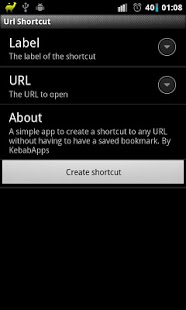
This very simple app lets you create home screen shortcuts to a webpage or any URL, without also having to have that website bookmarked in your browser. It will work with any Android browser and will popup Android's 'choose a browser' window if you have an alternative browser installed. Remember that you can create a home screen folder to put all of these shortcuts in.
NOTE: This app does NOT have its own launcher icon. The only way to "open" it is to long-press a blank area of your home screen and choose to add a shortcut using 'Url Shortcut'. Some new launches hide shortcuts amongst the other widgets. If your launcher has a widgets drawer then you should look in there for a 1x1 Url Shortcut widget.
You should use a good launcher like ADW Launcher, Launcher Pro or Go Launcher which lets your specify custom icons. This means that I don't have to bundle a billion icons with this app.
NOTE 2: Use 'URL Shortcut' and the 'Desktop VisualizeR' to create shortcuts with whatever icons you like:
https://play.google.com/store/apps/details?id=jp.co.bii.android.app.dskvzr&hl=en
If you give this app 1 star, you have anger management issues and expect too much from the people around you. You will be unable to find someone to care for you and this will benefit the rest of us by stopping your negative genes from propagating to the rest of the population. If you have problems (with the app, not in general) or suggestions, press the contact button in the Android market app :)
People with anger management issues:
------------------------------------
Jeffzda - you've missed the point of this app. The idea is to NOT clog up your browser's bookmarks with more URLs.
Byron - There's no misrouting going on, that's Android not knowing what to do with a mailto: URL. The shortcut this app creates simply has 'data' set to whatever you give it. If I claimed to treat mailto: URLs any different then fair enough, but I didn't. To the anger clinic with you!
Lisa - Lisa, Lisa, Lisa... did you even bother to read the application's description? There is no launcher icon for it, because that isn't how you used it. Do you also know that I can't actually reply to you to help you? Ah well, that's another 1 star attached to this app forever. You've probably uninstalled it already and forgotten about its existence. The Play Store isn't going to forget about that 1 star though :'(
About Url Shortcut
The company that develops Url Shortcut is KebabApps. The latest version released by its developer is 1.0.
To install Url Shortcut on your Android device, just click the green Continue To App button above to start the installation process. The app is listed on our website since 2013-12-23 and was downloaded 0 times. We have already checked if the download link is safe, however for your own protection we recommend that you scan the downloaded app with your antivirus. Your antivirus may detect the Url Shortcut as malware as malware if the download link to com.kebab.UrlShortcut is broken.
How to install Url Shortcut on your Android device:
- Click on the Continue To App button on our website. This will redirect you to Google Play.
- Once the Url Shortcut is shown in the Google Play listing of your Android device, you can start its download and installation. Tap on the Install button located below the search bar and to the right of the app icon.
- A pop-up window with the permissions required by Url Shortcut will be shown. Click on Accept to continue the process.
- Url Shortcut will be downloaded onto your device, displaying a progress. Once the download completes, the installation will start and you'll get a notification after the installation is finished.
Program Details
System requirements
Download information
Pricing
Version History
version 1.0
posted on 2013-12-23
First version
version 1.0
posted on 2011-11-26
Several fixes and updates
Disclaimer
External Download
We do not host Url Shortcut on our servers. We did not scan it for viruses, adware, spyware or other type of malware. This app is hosted by Galad and passed their terms and conditions to be listed there. We recommend caution when installing it.
The APK Download link for Url Shortcut is provided to you by apps112.com without any warranties, representations or guarantees of any kind, so access it at your own risk.
If you have questions regarding this particular app contact the publisher directly. For questions about the functionalities of apps112.com contact us.
